Claude Code @ GLO HCM Payroll
AI-Powered Coding Assistant via HAI Proxy AI-Powered Coding Assistant - 通过 HAI Proxy 接入
1 What is Claude Code Claude Code 是什么
Claude Code is an AI-powered coding assistant developed by Anthropic and officially rolled out at SAP. It understands your entire codebase, works across multiple files, and helps you build features, fix bugs, and automate development tasks.
Claude Code 是 Anthropic 开发、SAP 官方 rollout 的 AI 编程助手。它能理解整个代码库,跨多个文件工作,帮助你构建功能、修复 bug、自动化开发任务。
Understands Codebase
理解代码库
Reads entire projects, understands context and dependencies
读取整个项目,理解上下文和依赖关系
Multi-file Operations
跨文件操作
Edit multiple files simultaneously, ideal for refactoring
同时编辑多个文件,适合重构和功能开发
Execute Commands
执行命令
Run build, test, git and other terminal commands
运行 build、test、git 等终端命令
Tool Integration
工具集成
Connect to external tools and data sources via MCP
通过 MCP 连接外部工具和数据源
2 Use Cases Claude Code 实际案例
Real use cases from the HCM/Payroll team:
以下是 HCM/Payroll 团队的真实使用案例:
Scenario A: Unfamiliar Territory
场景 A:完全不熟悉的领域
Let AI teach you directly — understand code logic, explain business rules, answer technical questions
让 AI 直接教你 —— 读懂代码逻辑、解释业务规则、回答技术问题
Scenario B: Existing Success Cases
场景 B:已有成功案例
Reuse experience and design — extend existing analysis methodology and document formats to other countries/scenarios
复用经验和设计 —— 将已有的分析方法论、文档格式扩展到其他国家/场景
3 Configuration 配置使用
Access via HAI Proxy (SAP enterprise LLM proxy) — free, compliant, no personal API key required.
通过 HAI Proxy(SAP 企业级 LLM 代理)接入,免费、合规、无需个人 API Key。
| Comparison | Direct Anthropic/OpenAI | Via HAI Proxy |
|---|---|---|
| Cost | Personal/Team payment | SAP unified billing ✓ |
| Auth | Personal API Key | SSO Enterprise Auth ✓ |
| Compliance | Data may leave region | SAP controlled env ✓ |
| Audit | None | Traceable ✓ |
| 对比项 | 直连 Anthropic/OpenAI | 通过 HAI Proxy |
|---|---|---|
| 费用 | 个人/团队付费 | SAP 统一付费 ✓ |
| 认证 | 个人 API Key | SSO 企业认证 ✓ |
| 合规 | 数据可能出境 | SAP 可控环境 ✓ |
| 审计 | 无 | 可追溯 ✓ |
No personal Anthropic API Key needed. Usage is tracked under enterprise account. This is SAP's officially recommended way to use AI tools.
你不需要自己的 Anthropic API Key,使用记录归入企业,是 SAP 官方推荐的 AI 工具使用方式。
4 Live Setup (macOS) 现场配置(macOS)
One-time Setup 一次性设置 ~5 min
# Step 1: Check Node.js (requires v18+)
node -v
# If not installed: https://nodejs.org/ or use nvm

# Step 2: Install Claude Code
npm install -g @anthropic-ai/claude-code

# Step 3: Verify Claude Code installation
claude --version
# Output: x.x.x (Claude Code)
# Step 4: Login to SAP GitHub Enterprise
gh auth login --hostname github.tools.sap
# Select: HTTPS → Login with a web browser → Browser SSO login

# Step 5: Add hAIperspace tap
brew tap hAIperspace/hai https://github.tools.sap/hAIperspace/hai-homebrew

# Step 6: Install hai CLI
brew install hai

# Step 7: Verify hai installation
hai version
# Output: hai version 1.1.1
Copy the commands above and paste to Cline — let AI install for you! For stability, feed commands in batches (Step 1-3 first, then Step 4-7).
直接复制上面的命令粘贴给 Cline,让 AI 帮你装!为了稳定,建议分批给指令(先 Step 1-3,再 Step 4-7)。
Share this page link to your colleague
把这个页面链接分享给同事
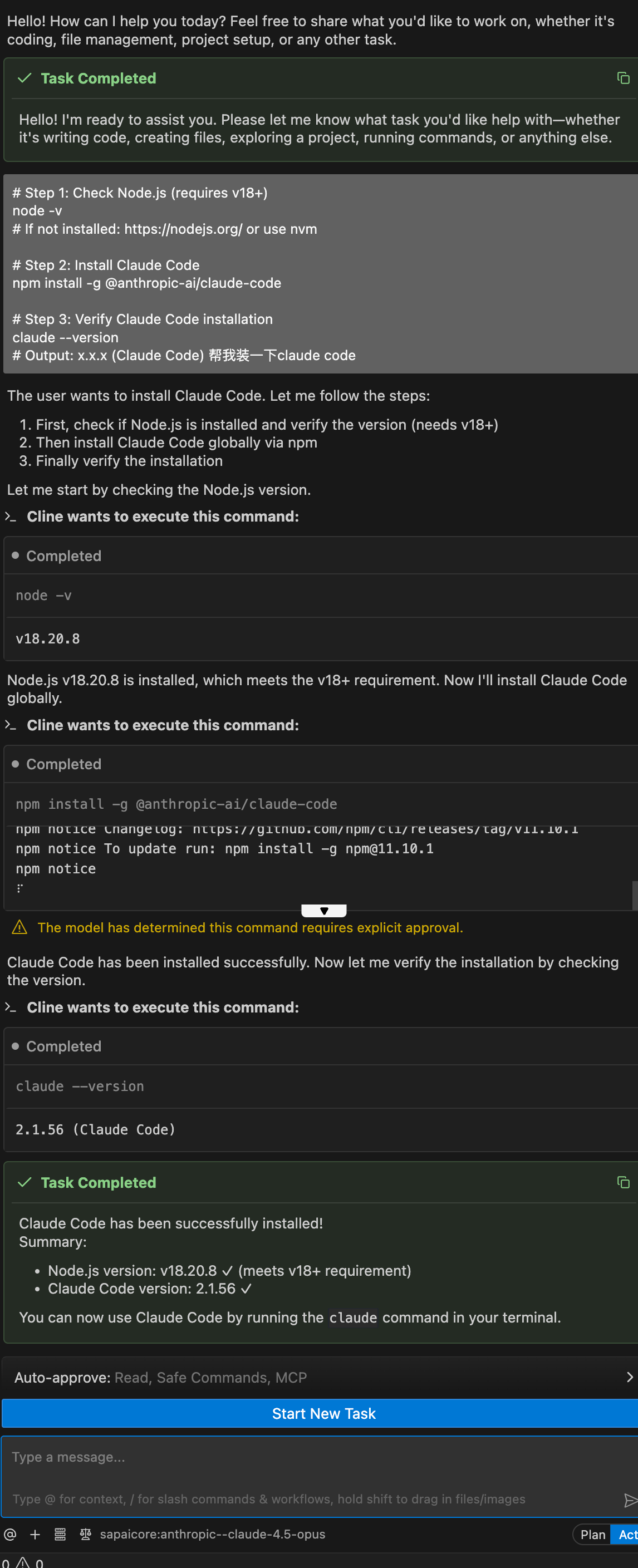
Cline executes commands automatically
Cline 自动执行命令安装
Each Use 每次使用 2 terminals needed 需要两个终端
# Terminal 1: Start proxy (keep it running!)
hai proxy start
# → Browser opens automatically, SSO login
# → Note the API Key displayed
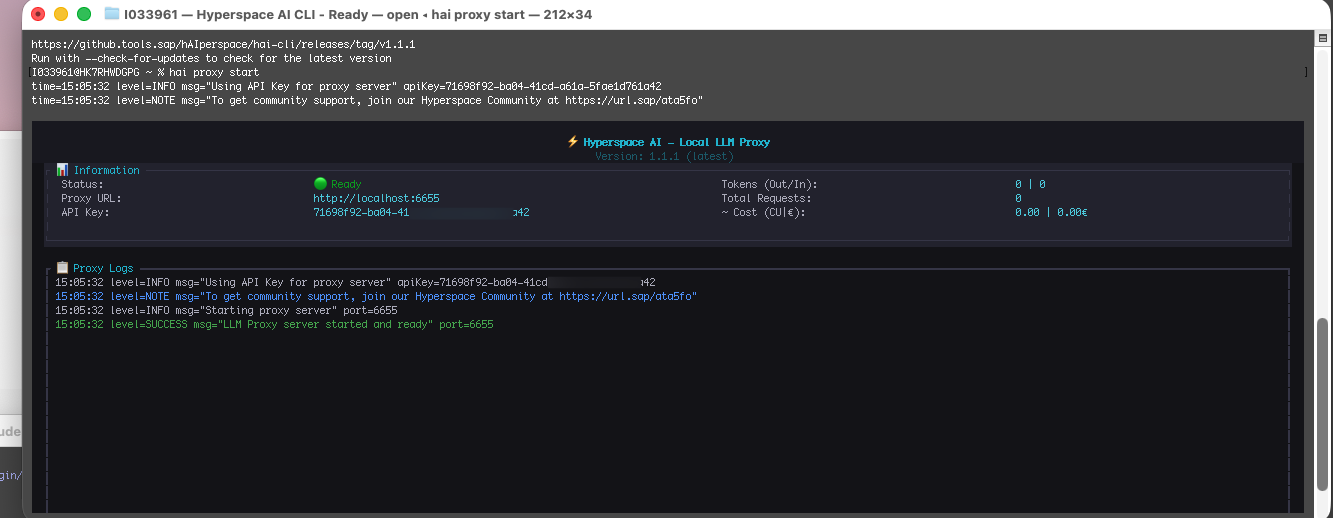
Terminal 1: HAI Proxy started, Status Ready, API Key generated
终端 1:HAI Proxy 启动成功,Status Ready,API Key 已生成
# Terminal 2: Configure and start Claude Code
export ANTHROPIC_BASE_URL=http://localhost:6655
export ANTHROPIC_API_KEY=<API Key from above>
claude

Terminal 2: Set environment variables and start Claude
终端 2:设置环境变量并启动 Claude
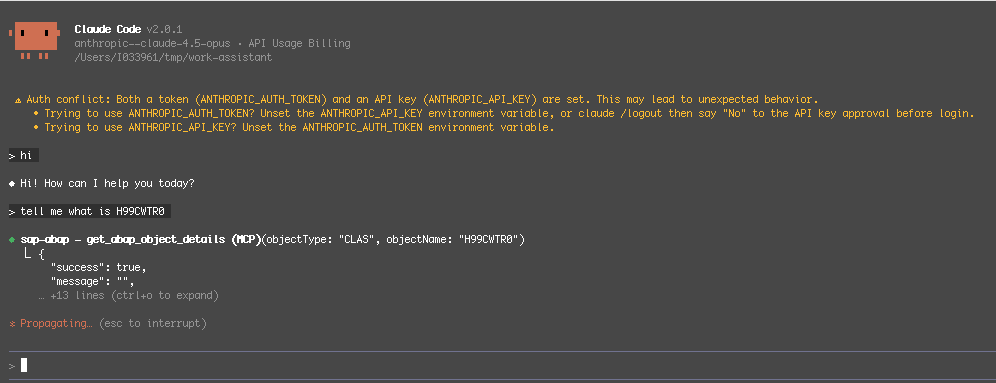
Claude Code started, querying ABAP object via MCP
Claude Code 启动成功,通过 MCP 查询 ABAP 对象
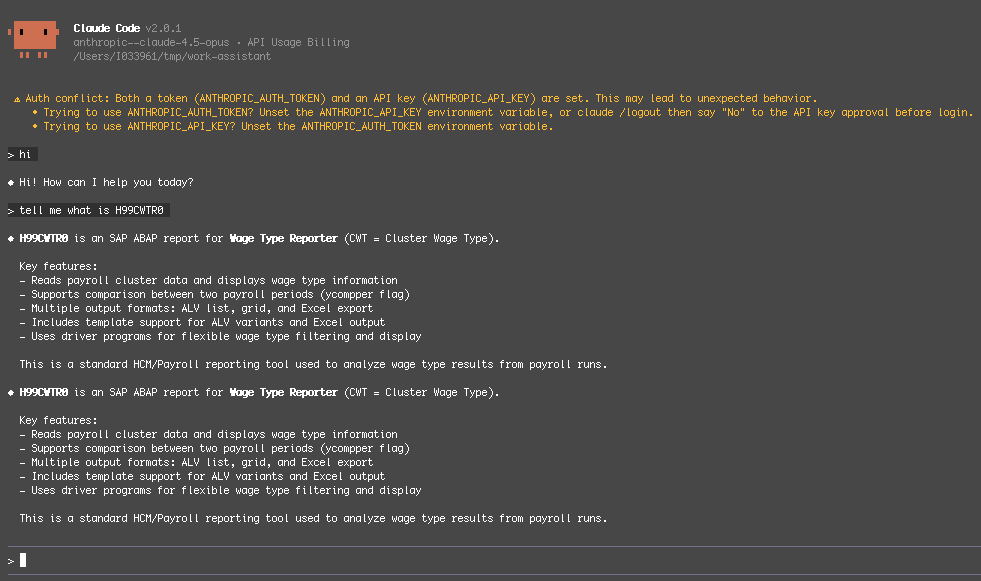
Result: H99CWTR0 is SAP Wage Type Reporter
结果展示:H99CWTR0 是 SAP Wage Type Reporter
Terminal 1 proxy must keep running. If closed, Claude Code will lose connection.
终端 1 的代理必须保持运行。如果关闭,Claude Code 将无法连接。
After Successful Setup
配置成功后
- Claude Code accesses AI services via HAI Proxy
- Claude Code 通过 HAI Proxy 访问 AI 服务
- No personal API Key needed, uses SAP enterprise account
- 无需个人 API Key,使用 SAP 企业账户
- All requests comply with enterprise requirements
- 所有请求符合企业合规要求
5 Troubleshooting 常见问题
If you see the "Select login method" screen when running claude, it means the configuration is missing. Run this command first:
如果运行 claude 时看到 "Select login method" 登录选择界面,说明配置缺失。先运行以下命令:
hai configure claude-code
Thanks to Guilherme and Liliyan for discovering and solving this issue! 感谢 Guilherme 和 Liliyan 发现并解决此问题!
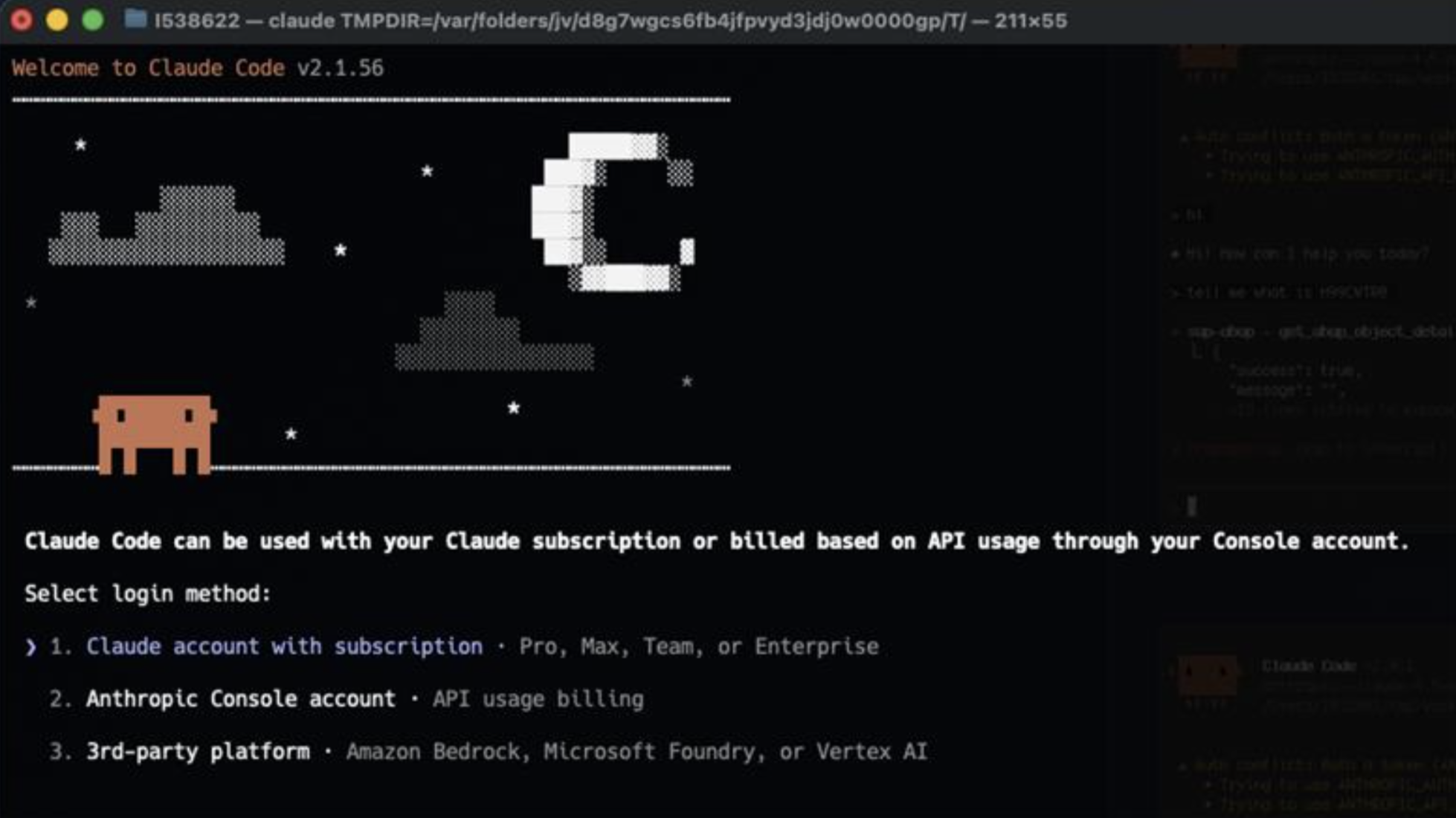
Problem: Login screen appears
问题:出现登录选择界面
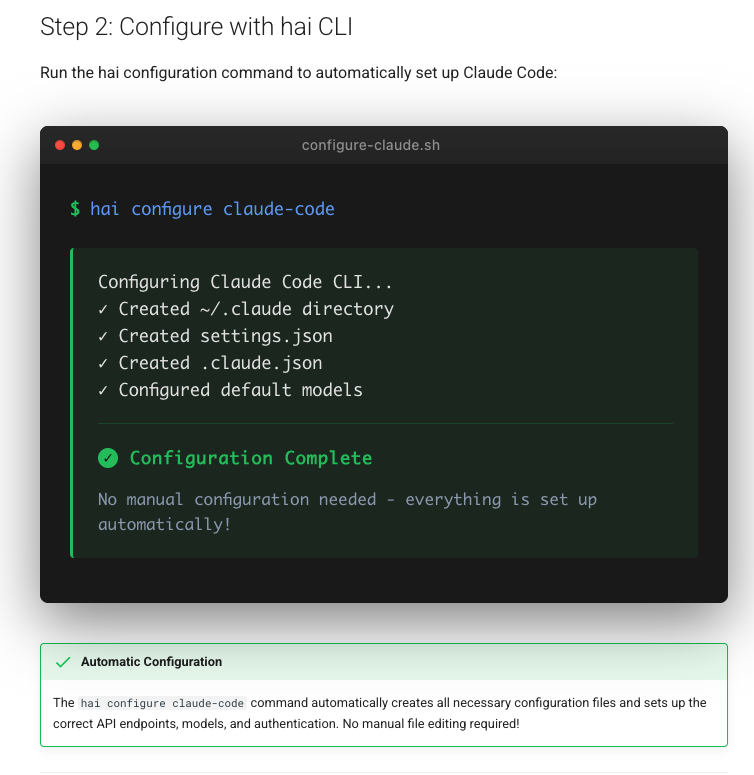
Solution: Run hai configure claude-code
解决:运行 hai configure claude-code